

TL;DR

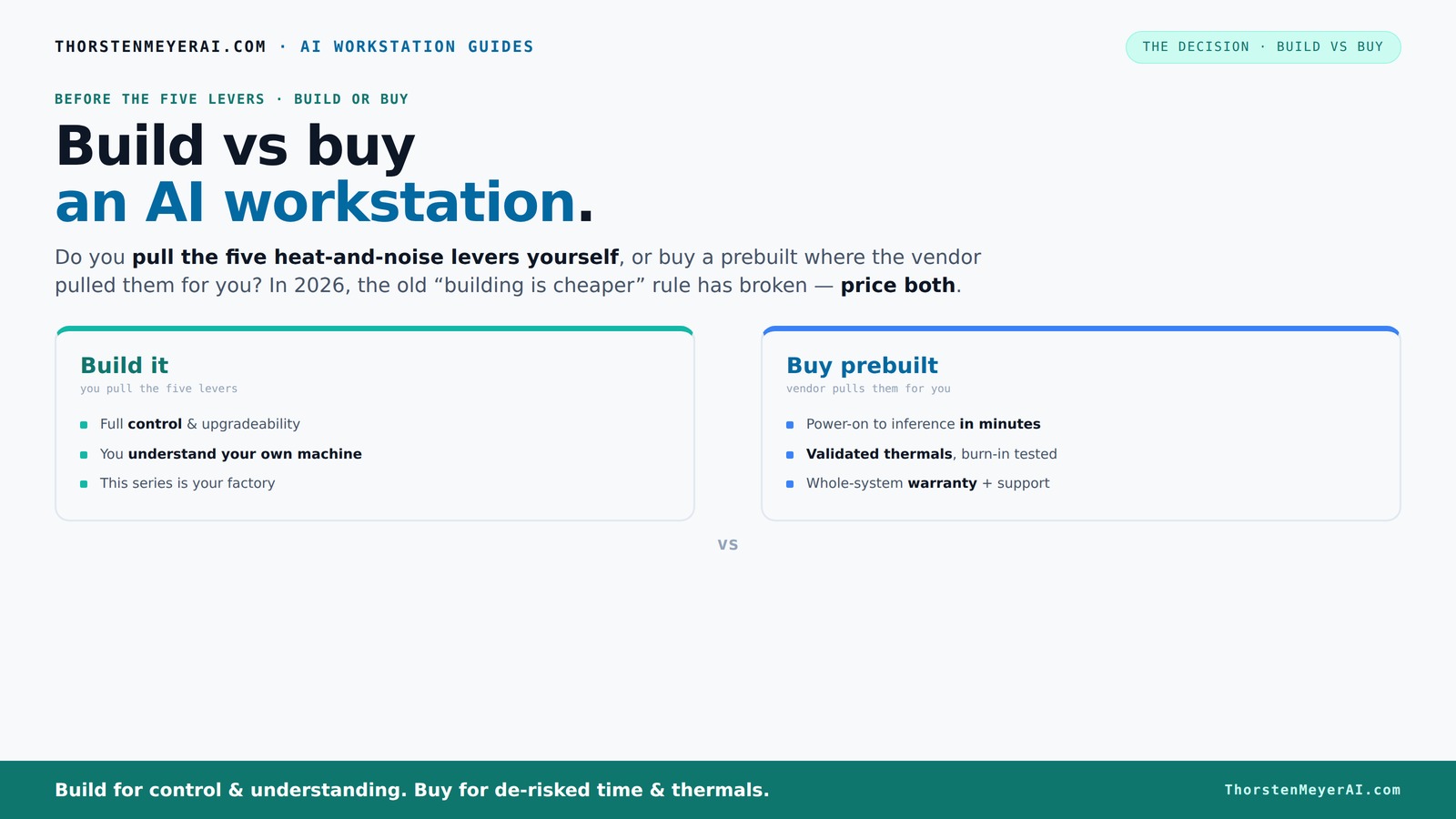
Building a DIY AI workstation was always cheaper, but recent shortages and price spikes mean prebuilt systems often match or beat DIY costs today. Your choice hinges on how much time, control, and support you want versus immediate performance and reliability.

Imagine this: you need a powerful AI workstation—fast, reliable, and ready to go. But should you build it yourself, pulling every lever for cooling, noise, and performance? Or is it smarter to buy a prebuilt, where experts have already tuned everything for peak efficiency? The landscape has shifted. What used to be a no-brainer—DIY always cheaper—no longer holds true. The recent AI boom and supply chain hiccups have leveled the playing field. Now, your decision depends on more than just cost. It’s about time, control, and peace of mind. Let’s break down what’s really happening in 2026 and help you choose the best route for your AI ambitions.
Build vs Buy an AI Workstation — Interactive Infographic
ThorstenMeyerAI.com · AI Workstation Guides
The decision · Build vs Buy · Interactive
Before the five levers · build or buy

Build vs buy
an AI workstation.

The real question behind this whole series: do you pull the five heat-and-noise levers yourself, or buy a prebuilt where the vendor pulled them for you? And in 2026, the old “building is cheaper” rule has broken. Match your situation in Part 3.

1 The 2026 plot twist
Building is no longer automatically cheaper
The AI boom you’re building this rig to join drove component shortages — RAM, GPUs, SSDs all spiked. The decades-old rule broke.
The cost math flipped
Until recently
DIY = cheaper, full stop
Buy prebuilt only to save time.
2026
Bulk-buyers can win on price
Vendors stocked up before the spike. DIY parts cost more now.
⚠ You can no longer assume DIY is the bargain. Price both, today, for your exact config.
2 The cluster’s lens
Who pulls the five levers?
Making a sustained-load rig cool & quiet takes five levers. Build-vs-buy is really: do you pull them, or does the vendor?
Build → you pull them
This series is your factory
1Undervolt the GPU
2Match the cooler
3Fix case airflow
4Tune the fans
5Place it well
You end up understanding your own machine.
Buy → vendor pulls them
Validated at the factory
Thermals validated
24–48h burn-in tested
Fan curves tuned
Water-cooling option
Warranty + support
You skip the thermal engineering.
3 Which is right for you?
Tap your situation
The recommendation lights up. There’s no universal winner — only a best fit.
My situation is…
Option A
Build it
Stretches a tight budget furthest, and the build is a learning experience.
Best fit
vs
Option B
Buy prebuilt
Power-on to inference in minutes, with validated thermals & a warranty.
Best fit
4 If you buy: the landscape
Who sells validated AI workstations
And the silent “prebuilt” that needs no levers at all.
Puget Systems
best support
24–48h burn-in on every system. Quiet under load.
BIZON
water-cooled
Up to 5-yr warranty; ~30% lower noise, no throttling.
Lambda
multi-GPU
Specialists in validated multi-GPU training rigs.
Mac Studio
silent
The ultimate prebuilt — no levers to pull at all.
5 The numbers
The decision in three figures
Counts animate to 2026 figures.
A sub-$1k build now costs
$1250+
component shortages pushed DIY up ~25%.
Vendor burn-in testing
48h
sustained GPU load before shipping — de-risked thermals.
Prebuilt warranty up to
5 yrs
labor + expert support — vs you coordinating per-part.
Vendor details and pricing context from 2026 prebuilt-workstation coverage (BIZON, Puget, Lambda, Compute Market) and component-pricing reporting. Prices shift constantly — quote your exact config. Affiliate disclosure on page.
ThorstenMeyerAI.com

Why Building Your Own AI Workstation Is No Longer the Cheap Option

Building your AI rig used to be the clear winner on price. But in 2026, component shortages and bulk buying by big vendors have changed the game. High-end GPUs like the NVIDIA RTX 4090 or A100 now cost more than ever—often $1,500 to $3,000 each—pushing total build costs well above $3,000.

A DIY build with top-tier parts can reach $10,000 if you're aiming for the best GPU and CPU combo. Yet, prebuilt systems from companies like Lambda or Puget are often priced competitively, thanks to their bulk procurement and optimized configurations. You might find a prebuilt with similar specs at $7,000, with support and warranty included.

So, the old rule—build cheaper, buy for convenience—no longer always applies. Now, you must price both options for your exact needs. The shift means that sometimes, paying a premium for a prebuilt makes more sense than piecing it together yourself.

Understanding this shift is crucial because it highlights how market dynamics directly impact your decision-making. When costs are close, other factors like support, reliability, and time-to-deploy become more significant. Choosing the cheaper option isn't just about dollar signs anymore; it's about the tradeoffs in effort, risk, and long-term value.

Corsair AI Workstation 300 Desktop PC – AMD Ryzen AI Max 385 CPU – AMD Radeon 8050S iGPU (Up to 48GBs vRAM) – 64GB LPDDR5X 8000MHz Memory – 1TB M.2 SSD – Black

Corsair AI Workstation 300 Desktop PC – AMD Ryzen AI Max 385 CPU – AMD Radeon 8050S iGPU (Up to 48GBs vRAM) – 64GB LPDDR5X 8000MHz Memory – 1TB M.2 SSD – Black

AI-Optimized Compact Workstation: Experience AI performance out of the box with the compact 4.4L form factor, built for...

As an affiliate, we earn on qualifying purchases.

As an affiliate, we earn on qualifying purchases.
The Five Levers of Cooling and Noise — Who Handles Them?

Running a high-performance AI workstation hot and loud is a recipe for throttling and frustration. The five levers? Undervolt the GPU, match the cooler, optimize airflow, tune fans, and position it well. You can pull all these yourself, or let a vendor do it for you.

If you buy prebuilt, the vendor handles everything. Companies like BIZON or Lambda validate thermals, tune fan curves, and even offer water cooling for quieter operation. They test under load, so your machine runs cool and silent—no guesswork. Learn more about dark psychology topics.

Building your own? You get to pick quiet GPUs, like those with a reputation for low noise, and engineer your airflow. You’ll learn how to undervolt to reduce heat, choose quiet coolers, and set up case fans for optimal airflow. It’s a hands-on process, but it grants total control and the ability to tweak as your needs evolve. This deep involvement allows you to understand exactly how your system manages heat and noise, which can lead to more efficient performance and longer component lifespan—crucial factors in high-stakes AI workloads where thermal stability impacts training times and hardware longevity.

Tall GPU Support Bracket - Heavy Duty Adjustable GPU Anti Sag Holder & Support Stand for Graphics Card, 4.53"-8.27" Height Durable Black Metal PC Build Stabilizer, Large/Long GPU Sag Prevention

Tall GPU Support Bracket - Heavy Duty Adjustable GPU Anti Sag Holder & Support Stand for Graphics Card, 4.53"-8.27" Height Durable Black Metal PC Build Stabilizer, Large/Long GPU Sag Prevention

Graphics Card Support -- This GPU support bracket is to provide support for the end of the graphics...

As an affiliate, we earn on qualifying purchases.

As an affiliate, we earn on qualifying purchases.

Frequently Asked Questions

Is building my own AI workstation cheaper than buying prebuilt?

Not always. In 2026, component shortages and bulk vendor buying have pushed prices so high that prebuilt systems often match or beat DIY costs for high-end setups. Always compare prices for your specific configuration.

What are the biggest risks of building my own AI workstation?

The main risks include compatibility issues, longer setup time, and potential troubleshooting. If you’re not comfortable with hardware assembly or don’t have time, a prebuilt reduces those headaches.

Can I upgrade a prebuilt AI workstation later?

Most can be upgraded, but some systems have proprietary designs that limit flexibility. Check with the vendor before buying if future upgrades are a priority.

What cooling solutions should I consider for a high-performance AI rig?

Look into liquid cooling options or high-quality air coolers. Proper airflow is critical—use quiet case fans and optimize placement to keep temperatures low and noise levels manageable. For tips, see this guide on reducing heat and noise. For tips, see this guide on reducing heat and noise.

How do I decide if my workload justifies a prebuilt or a DIY build?

If your workload requires immediate setup, reliability, and support, a prebuilt is usually better. If you enjoy tuning and have time to learn, building your own can be more cost-effective and tailored to your needs.
ZOTAC MEK Gaming PC Desktop, NVIDIA GeForce RTX 5060 Ti 16GB GDDR7, AMD Ryzen 7 9700X Up to 5.5GHz, 32GB DDR5, 1TB NVMe SSD, 850W 80+ Gold PSU, WiFi 6E, Windows 11 Home

ZOTAC MEK Gaming PC Desktop, NVIDIA GeForce RTX 5060 Ti 16GB GDDR7, AMD Ryzen 7 9700X Up to 5.5GHz, 32GB DDR5, 1TB NVMe SSD, 850W 80+ Gold PSU, WiFi 6E, Windows 11 Home

Effortless Gaming: MEK from ZOTAC comes with all hardware and Windows 11 Home pre-installed. Crafted in the USA,...

As an affiliate, we earn on qualifying purchases.

As an affiliate, we earn on qualifying purchases.

Conclusion

In the end, your decision boils down to one thing: do you want to tinker and learn, or do you want a system that’s ready to run now? Recent hardware shifts make both choices viable—so pick what fits your workflow, skill set, and ambitions. The right AI workstation is the one that gets you up and running, without surprises.
NVD RTX PRO 6000 Blackwell Professional Workstation Edition Graphics Card for AI, Design, Simulation, Engineering - 96GB DDR7 ECC Memory - 4th Gen RT/5th Gen Tensor Core GPU - OEM Packaging

NVD RTX PRO 6000 Blackwell Professional Workstation Edition Graphics Card for AI, Design, Simulation, Engineering - 96GB DDR7 ECC Memory - 4th Gen RT/5th Gen Tensor Core GPU - OEM Packaging

[NVIDIA Blackwell Streaming Multiprocessor] The new SM features increased processing throughput, and new neural shaders that integrate neural...

As an affiliate, we earn on qualifying purchases.

As an affiliate, we earn on qualifying purchases.

You May Also Like

Chint reliability

Recent reports question Chint’s solar product reliability, raising concerns for consumers and industry stakeholders. Details are still emerging.

Hetzner Price Adjustment

Hetzner announced a price increase effective June 15, 2026, affecting new orders and cloud services, with existing orders unaffected until delivery.

Mopp für Hartböden: Wie man im Alltag Mühe spart

Die richtige Wahl und Verwendung des richtigen Mopses kann Ihren Reinigungsaufwand erheblich reduzieren und die Lebensdauer Ihres Bodens verlängern – erfahren Sie, wie.

Euro hinge won’t open

A common issue with euro hinges not opening has emerged, causing frustration for DIY enthusiasts. Confirmed causes and next steps remain unclear.